Overview
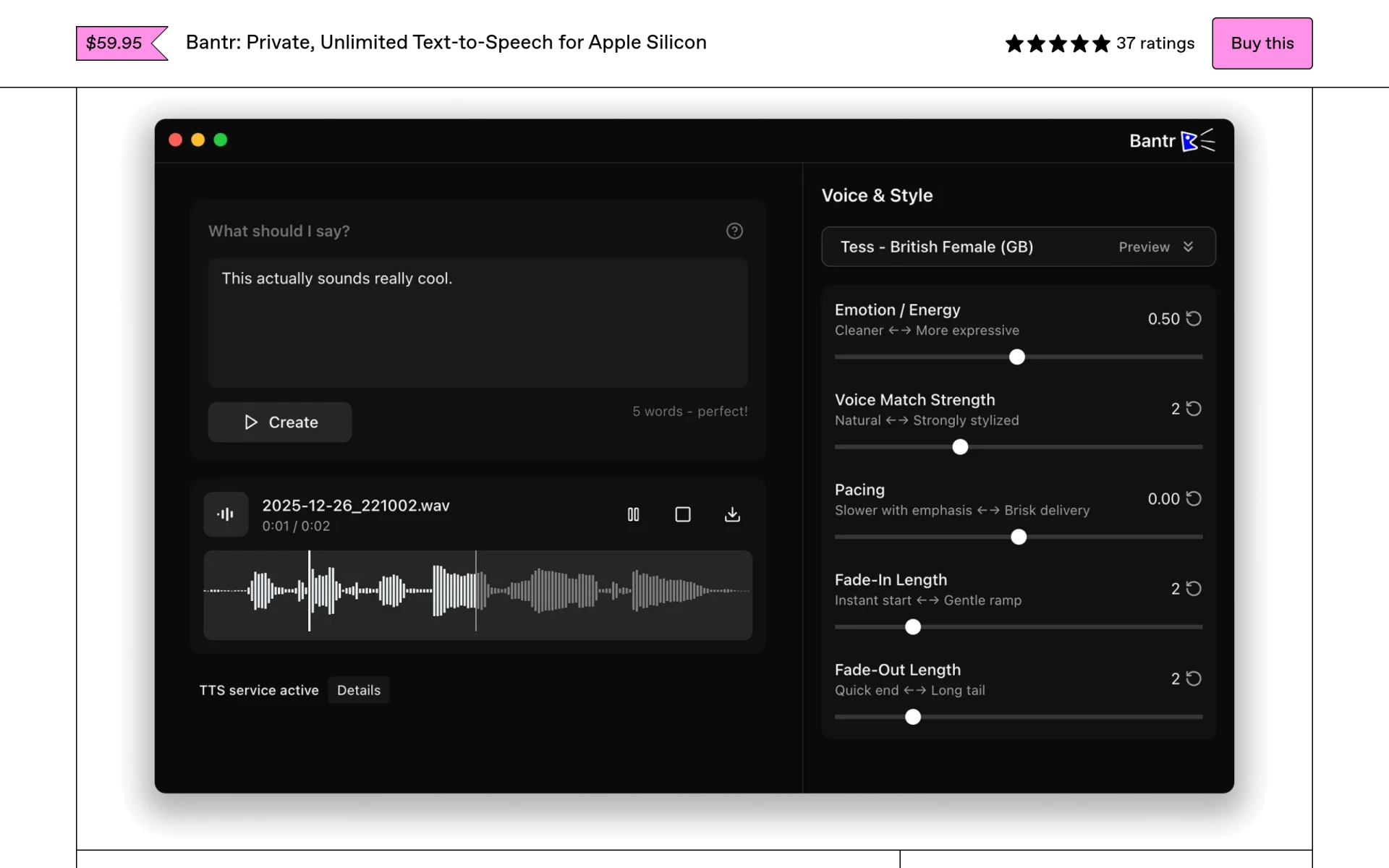
Bantr is a text-to-speech (TTS) application designed specifically for Apple Silicon Macs, providing users with the ability to convert text into natural-sounding speech. The primary purpose of Bantr is to offer a fully offline experience, allowing users to generate voiceovers without relying on cloud services, which often come with privacy concerns and usage limitations. By running entirely on the user's Mac, Bantr addresses common issues associated with traditional TTS tools, such as subscription costs and data privacy.
Key Features
- Offline functionality: Works without an internet connection.
- Unlimited usage: No subscription fees or usage limits.
- Over 200 expressive voices: A diverse range of voice options.
- Voice cloning: Ability to clone your own voice using short samples.
- Compatibility: Designed for Apple Silicon Macs (M1 and newer).
- Multi-document support: Capable of reading various file types like PDFs and DOCX.
- Read-along mode: Allows users to follow along as text is read aloud.
- Regular updates: Continuous improvements based on user feedback.
Benefits
Bantr provides practical advantages for individuals and businesses alike. Its offline capability ensures that users' data remains secure and private, which is increasingly important in today's digital landscape. The pay-once pricing model eliminates the recurring expenses associated with cloud-based TTS services, making it a cost-effective solution. Additionally, the application’s extensive library of expressive voices allows for a more personalized and engaging listening experience, which is beneficial for content creators and educators.
Common Use Cases
Bantr can be utilized in various situations, including:
- Content creators producing voiceovers for videos or podcasts.
- Educators providing audio versions of written materials for students.
- Developers incorporating voice synthesis into applications or games.
- Businesses creating product demos or training materials that require narration.
- Individuals using the app for personal projects, such as reading documents aloud.
Who Should Use It
Bantr is ideal for content creators, educators, and developers who require high-quality voice synthesis without the constraints of online services. It may not be the best fit for users who rely on multi-device functionality or require extensive language support, as it currently caters primarily to English-speaking users.
Pricing Overview
Bantr operates on a one-time purchase model, with no ongoing subscription fees. Specific pricing details are not provided on the website.
Conclusion
Bantr stands out as a reliable and private text-to-speech solution for Mac users, particularly those who prioritize offline access and data security. While it excels in providing expressive voices and ease of use, potential users should consider whether its current limitations, such as language support and cross-device functionality, align with their specific needs. Overall, Bantr is a worthwhile investment for those looking for a straightforward TTS application without ongoing costs.